If you run a fleet — equipment rental, heavy haul, last-mile, field service — you already know the pattern. The operations team lives in the fleet ERP. Finance closes the month in the accounting system. HR runs the pay cycle in the payroll provider. The yard and the drivers live inside the telematics platform. Each is good at what it does. The cost shows up at the seams between them — in re-keyed timecards, missed invoices, AR aging that doesn't reconcile, and utilization reports that take a week to assemble because the data lives in five places.
This piece is for the fleet manager, the controller, and the payroll lead who are tired of being the integration. It walks through the data flows that actually matter, the systems we support out of the box, and the build / test / deploy / support model we use to make these integrations safe to run unattended.
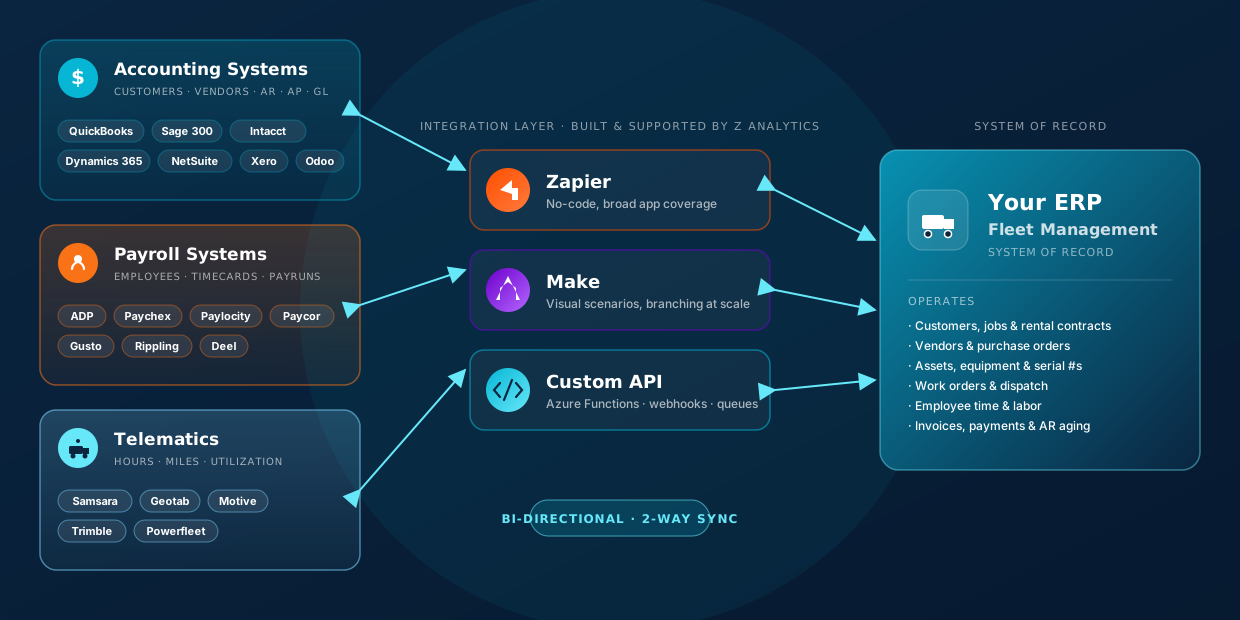
We build bidirectional integrations between your fleet ERP and the rest of your stack — accounting (customers, vendors, AR, AP, GL), payroll (employees, timecards, processed pay records), and telematics (hours, miles, utilization). Scheduled or realtime, depending on the use case and what the system allows. We build, we test, we deploy, and we stay on to support them — and we put reporting / dashboards on top so the integrated data turns into decisions.
/ 01 · THE LANDSCAPEWhere the data actually lives
Before talking integration, it helps to be clear about which system should own which truth. Get that wrong and even a perfect integration creates a mess.
| Domain | Source of truth | Typical flow direction |
|---|---|---|
| Customers & jobs | Fleet ERP | ERP → Accounting |
| Vendors & bills | Accounting (usually) | Accounting ↔ ERP |
| Invoices & AR | Fleet ERP (billing) | ERP → Accounting; payment status back |
| AP & payments | Accounting | Accounting → ERP (status) |
| GL adjustments | Accounting | ERP → Accounting (journals) |
| Employees | ERP / HR module | ERP → Payroll |
| Timecards | ERP (operations time) | ERP → Payroll |
| Processed pay records | Payroll | Payroll → ERP (GL post) |
| Assets, hours, miles | Telematics | Telematics → ERP |
| Asset master & serials | Fleet ERP | ERP → Telematics (assignment) |
Most integration problems we get called into are the result of two systems each thinking they own the same record. The right answer is almost always: pick one owner per domain, then keep the others in sync with a clear, auditable flow. That's what each section below assumes.
/ 02 · ACCOUNTING INTEGRATIONSCustomers, vendors, AR, AP & GL — both directions
Accounting integrations are about giving your controller a clean GL close without asking ops to do data entry. The build covers five flows, almost all of them bidirectional in some form.
What we move
- Customer master — created in the ERP when a new account is on-boarded, synced to accounting so invoices land on the right customer record. Updates flow back if a customer is edited in accounting.
- Vendor master — typically created in accounting (where banking and 1099 lives) and synced to the ERP so POs can reference them.
- Accounts Receivable — invoices are produced in the fleet ERP (because the line items come from jobs / contracts / rentals) and pushed to accounting; payment status flows back so collections sees who's paid.
- Accounts Payable — bills entered against POs in accounting; payment status surfaces in the ERP so ops sees vendor liability.
- General Ledger transactions — journals for non-billed adjustments (depreciation, fuel reclass, intercompany) flow from ERP to accounting on a posting schedule.
Accounting systems we integrate with
| System | Interface | Notes |
|---|---|---|
| QuickBooks Online | QBO REST API, webhooks | Realtime-capable; common SMB & mid-market fleet choice. |
| QuickBooks Desktop | Web Connector / IIF / QODBC | On-prem; scheduled sync via Web Connector is the safe pattern. |
| Sage 300 | Sage 300 Web API · Orchid I/O | Strong fit for equipment & construction-adjacent fleets. |
| Sage Intacct | Sage Intacct API (XML/REST) | Cloud, multi-entity friendly; clean dimension model. |
| Microsoft Dynamics 365 | D365 BC / F&O Web Services · Dataverse | Deep ERP-level integration; works well with Azure Functions. |
| NetSuite | SuiteTalk REST · SuiteScript | Standard for larger fleets & multi-subsidiary operators. |
| Xero | Xero Accounting API · webhooks | Fastest path for AU/NZ & UK SMB fleets. |
| Odoo | Odoo XML-RPC / JSON-RPC | Open-source flexibility; we build custom modules where needed. |
If your accounting system isn't on this list, it's almost certainly still doable — every system above is one we've built against, and any system with an API or a structured file export can be integrated. The list is "what we keep templates for," not "what's possible."
/ 03 · PAYROLL INTEGRATIONSEmployees, timecards & processed pay records
Payroll is the integration where the operational pain is loudest. Drivers and yard staff log time inside the fleet ERP (because that's where dispatch and job assignment lives). Pay runs happen in the payroll system. Without integration, someone is exporting CSVs and praying. With integration, the time flows automatically, the pay run reconciles, and the GL post comes back clean.
What we move
- Employees — master record (name, role, pay class, cost center, status) from the ERP / HR module to payroll. New hires and terminations propagate within the cycle.
- Timecards — operational time from the ERP (clock punches, job-coded hours, overtime classification, per diem, location) into payroll in a format that matches the payroll system's batch import.
- Processed payroll records — once payroll has run, the processed register flows back into the ERP so labor expense posts to the right GL accounts, jobs, and cost centers — usually one journal per pay run with the full breakdown.
Payroll systems we integrate with
| System | Interface | Notes |
|---|---|---|
| ADP (Workforce Now / RUN) | ADP Marketplace APIs · SFTP batch | Most common enterprise fit; supports realtime where API tier permits. |
| Paychex (Flex) | Paychex Flex API · CSV import | Solid SMB-to-mid coverage; scheduled cycle works cleanly. |
| Paylocity | Paylocity Web Services API | Modern REST; good for time + processed-pay round trip. |
| Paycor | Paycor Public API | Mid-market focus; well-suited to multi-location fleets. |
| Gusto | Gusto Embedded / Public API | Strong for SMB fleets; clean developer experience. |
| Rippling | Rippling API · workflow webhooks | Combined HR + payroll; great for tech-forward operators. |
| Deel | Deel API | For fleets with international contractors / EOR coverage. |
The two integration choices that bite later are timecard classification (regular vs OT vs per diem vs reimbursable) and pay-period boundaries (when an op ran across midnight / the cutoff). We spend the discovery phase on these because getting them right makes the payroll run reconcile on the first attempt instead of the third.
/ 04 · TELEMATICS INTEGRATIONSHours, miles & utilization — your fleet's heartbeat
Telematics is where the cleanest data wins start to compound. Your trucks, equipment, and tools are already broadcasting hours, distance, fuel, idle time, and location. Bringing that into the ERP unlocks two things at once: billing accuracy (charge for the right hours / miles) and utilization analytics (which assets are earning, which are sitting).
What we move
- Asset hours — engine hours, PTO hours, idle hours by asset and by day, posted to the ERP for billing and maintenance scheduling.
- Mileage — odometer readings and trip distance by asset / driver / job, aligned to ERP job codes where possible.
- Driver activity — login / logout, HOS status, route adherence — useful for both compliance and payroll reconciliation.
- Geofence & event signals — arrival / departure at sites, used to trigger billing events or dispatch updates in the ERP.
- Asset master sync — the ERP pushes asset additions / retirements to the telematics provider so the asset list stays clean both ways.
Telematics systems we integrate with
| System | Interface | Notes |
|---|---|---|
| Samsara | Samsara REST API · webhooks | Strong API coverage; near-realtime for events and locations. |
| Geotab | Geotab SDK / MyGeotab API | Rich rule engine; works well for HOS & utilization extracts. |
| Motive (formerly KeepTruckin) | Motive Fleet API · webhooks | Common in long-haul and last-mile; strong driver-side data. |
| Trimble (PeopleNet / TMW) | Trimble Maps APIs · TMW Web Services | Heavy-duty trucking heritage; deeper TMS-side integration available. |
| Powerfleet | Powerfleet Unity API | Mixed-asset fleets (industrial, logistics, automotive). |
/ 05 · REALTIME vs SCHEDULEDChoosing the right cadence per flow
Not every integration needs to be realtime, and not every realtime integration is even possible — some systems just don't expose the events. The cleanest builds match cadence to use case.
| Flow | Typical cadence | Why |
|---|---|---|
| Customer master sync | Hourly / event-driven | Low volume, but needs to be there when ops creates an invoice. |
| Vendor master sync | Nightly | Banking changes are infrequent; off-hours is safer. |
| AR invoices (ERP → accounting) | Near-realtime (every 5–15 min) | Tight loop with finance & collections. |
| AR payment status (accounting → ERP) | Realtime via webhook where available | Drives collections priority & credit hold logic. |
| AP bill status | Hourly | Ops needs same-day vendor visibility, not sub-minute. |
| GL journal post | End-of-day batch | Aligns with close discipline; easier to reconcile. |
| Employee master to payroll | Daily + on-event for new hires & terms | Sensitive — we always include audit on this one. |
| Timecards to payroll | Per pay period + interim health check | Avoid mid-cycle drift; verify 24 h before pay run. |
| Processed pay → ERP GL | Per pay run | One clean journal per cycle is the goal. |
| Telematics hours / miles | Every 15 min or event-driven | Near-realtime drives billing accuracy & dispatch decisions. |
| Telematics geofence events | Realtime webhook | Used to trigger billing or status changes. |
The cadence column above is a starting point — the right answer always depends on volume, what the source system actually exposes (some only offer polling), and what your downstream processes can absorb. We default to the lowest-latency option a system allows, then dial back if it's noisy or expensive.
/ 06 · REPORTING & DASHBOARDSWhere the integrated data starts to pay for itself
Clean integration is the precondition. The payoff shows up when you layer Power BI, Excel, or a custom dashboard on the now-connected data and start answering questions the business couldn't answer before — at least not without a Tuesday-afternoon scramble.
The kind of dashboards we build on top of these integrations:
- Fleet utilization — earning hours vs idle hours, by asset and asset class, with depreciation overlay.
- Revenue & AR aging — invoiced revenue, payment lag, days-sales-outstanding by customer and job type, reconciled to accounting.
- Labor cost per unit — payroll cost per billable hour, per mile, or per stop — using payroll's processed records joined to telematics.
- Maintenance forecasting — predictive service windows from telematics hours / miles, feeding the ERP work-order pipeline.
- Driver scorecards — safety, HOS adherence, on-time, fuel efficiency, mapped back to payroll incentive programs.
Each of these dashboards needs data from at least two of the three systems we just covered. That's why we treat integrations and analytics as one engagement — there's no clean dashboard without the integration, and there's no return on the integration without the dashboard. We build both.
/ 07 · HOW WE WORKBuild · test · deploy · support
An integration that runs once is a demo. An integration that runs unattended for two years is engineering. The four phases below are what move you from one to the other.
1 · Build
- Discovery on data ownership and direction.
- Pick the integration layer — Zapier, Make, or a custom Azure-hosted API — based on cadence, volume, and complexity.
- Idempotency, dedup keys, and audit logging in from day one.
2 · Test
- Sandbox-to-sandbox dry runs against real volume snapshots.
- Field-by-field reconciliation before go-live.
- User acceptance with the controller, payroll lead, and ops together — not in sequence.
3 · Deploy
- Staged cutover with parallel run where the systems allow it.
- One-cycle checkpoint — first close, first pay run, first week of telematics.
- Documented runbook handed to your team.
4 · Support
- Proactive alerting on failures, latency, and dedup mismatches.
- Monthly health review with the integration metrics.
- Engaged through close & pay cycles — when things actually matter.
/ CLOSINGThe business should run on operations, not on integration
The right outcome of a fleet integration program is that your team stops noticing it. Invoices show up where they should. Pay runs reconcile. Utilization reports refresh themselves. Your finance lead closes on time, your payroll lead spends the cycle on exceptions instead of data entry, and your fleet manager is back to running the fleet.
If you'd like a second pair of eyes on the integrations you have today, or a fresh build across accounting, payroll, telematics, or all three — tell us where you are and we'll come back within a business day with a real perspective on what to build, what to leave alone, and what order to do it in.
We build, test, deploy, and support integrations between your fleet ERP and your accounting, payroll, and telematics systems — scheduled or realtime depending on the use case and system limitations — and we layer reporting and dashboards on top so the connected data turns into insight. So your team can focus on running the fleet.