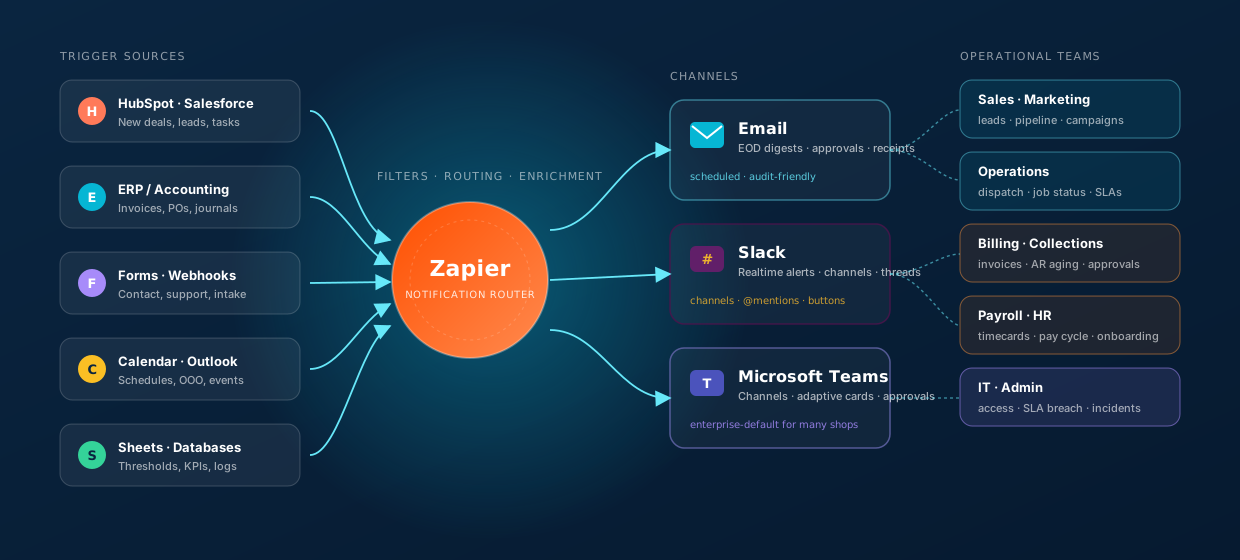
Every operational team we work with eventually says the same thing: “We're drowning in tabs but we still miss the thing that matters.” The CRM has the lead. The ERP has the invoice. The form has the request. The telematics platform has the alert. Each one is doing its job — but the humans who need to act on those signals live in Slack, in Microsoft Teams, and in their email inbox. The gap between those two worlds is the entire reason notification automations exist.
Done well, notifications make a team feel like it has reflexes — handoffs land cleanly, alerts go to the right person, end-of-day digests close out the day, and approvals happen in the chat instead of the inbox. Done badly, they create channel fatigue and people start muting you. This piece is the playbook we use to build the first kind and avoid the second.
Use Zapier as the routing brain. Pick the channel per use case — email for digests and audit trails, Slack for real-time channels and threads, Microsoft Teams for adaptive cards and approvals. Design every notification as a verb (handoff, alert, request, digest, kudo), put a name on it (@mention the person who has to act), and put a button on it (the next action, one click away). Then layer a dashboard on top — Google Sheets for fast, Azure-hosted for governed — so you can see what's actually moving.
/ 01 · HANDOFF NOTESFrom one team to the next, with full context
The single highest-leverage notification automation is the handoff. Almost every operational drop-off is a handoff that happened in someone's head and didn't make it to the next person until Tuesday. Zapier solves this — when the upstream system records the moment a handoff is supposed to happen, Zapier fires a message in the receiving team's channel with the context already attached.
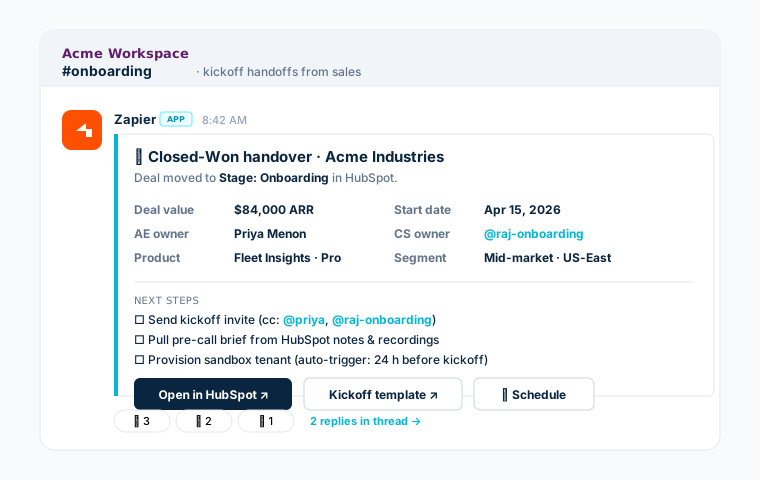
Sales → Onboarding · the canonical handoff
A deal moves to Closed-Won in HubSpot. Within seconds, the onboarding team's Slack channel sees a card with the deal value, start date, AE owner, product, segment, and an @-mention of the assigned CS lead. The next steps are pre-checked. The CRM link is one click away. There is no follow-up email to write, and nothing is sitting in someone's drafts folder.
Other high-leverage handoffs we build
- Operations → Billing — job marked complete in the ERP, billing team gets the timesheet and parts list ready to invoice.
- Support → Engineering — Zendesk ticket escalated, eng channel sees the customer impact, the reproduction steps, and the on-call name.
- Field tech → Dispatch — equipment marked broken in telematics, dispatch sees the asset, the location, the next scheduled job, and a "reassign" button.
- Payroll → Finance — pay run posted, finance gets the GL summary and the variance vs prior cycle in a Teams card.
- IT onboarding → New hire's manager — accounts provisioned, manager gets a Slack card with the welcome packet links and the first-day checklist.
The pattern is always the same: the upstream system records a state change → Zapier enriches with the context the next team needs → the message lands where they live, with one button per likely next action.
/ 02 · EMAIL vs CHATReal-time alerts vs end-of-day digests
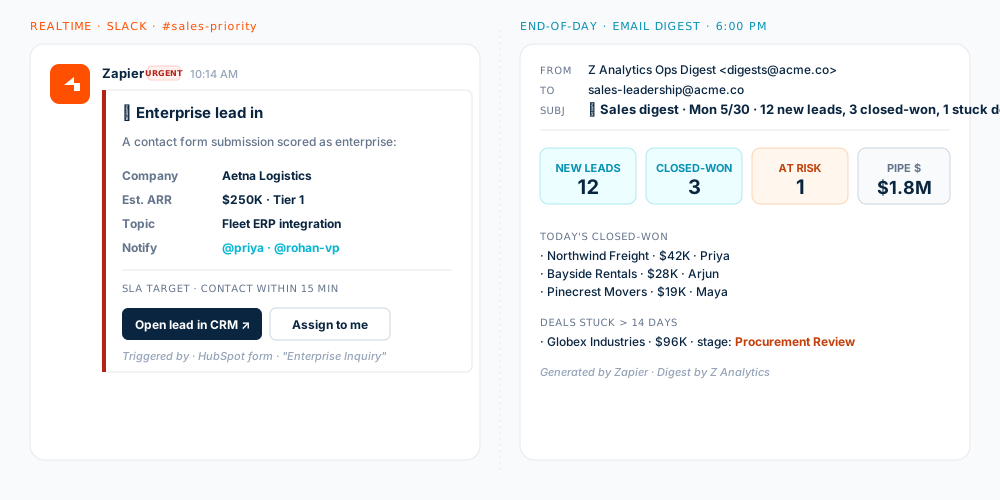
This is the question every team gets wrong the first time. The instinct is to send every notification everywhere, which is exactly how you get muted. The right answer is to match the shape of the signal to the shape of the channel.
When to use each
| Use case | Recommended channel | Cadence | Why |
|---|---|---|---|
| High-value lead in | Slack channel | Real-time | SLA-bound; needs an owner within minutes. |
| Daily pipeline digest | EOD scheduled | Skim once, archive, reference later. | |
| Approval request | Teams adaptive card | Real-time | Decision happens in the message itself. |
| SLA breach alert | Slack DM + channel | Real-time | Personal + visible to the team. |
| Payroll cycle digest | Email + Teams | Per pay run | Email for audit, Teams for confirmation. |
| Customer kudo | Slack #shoutouts | Real-time | Public recognition lands while it's fresh. |
| Out-of-office handoff | Slack DM to backup | Real-time | Context-bearing, not just a CSV row. |
| Weekly KPI review | Email + dashboard link | Scheduled · weekly | Reading, not reacting. |
| Incident · system down | Slack #incidents + page | Real-time | Channel + page = visibility + urgency. |
| Compliance / audit log | Scheduled | Email creates the paper trail. |
If you can only build one notification automation this quarter, build the end-of-day digest. It's the lowest-noise, highest-leverage one — leadership sees the day in 30 seconds, the team feels visible, and you've made the case for everything else you want to automate next.
/ 03 · APPROVAL WORKFLOWSRequest, decide, update the ERP — without leaving the chat
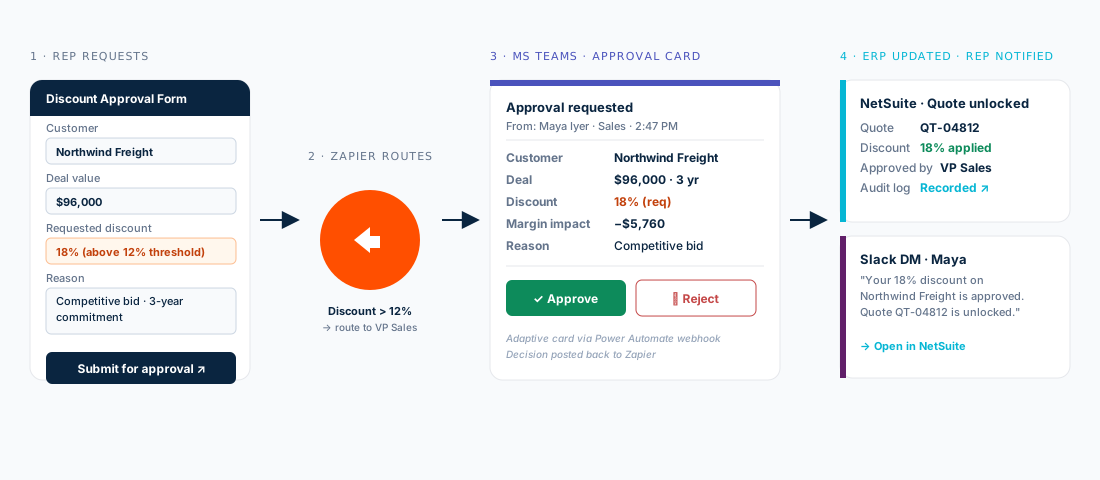
Approvals are where notification automations stop being "nice" and start being load-bearing. A discount needs sign-off. A refund needs the controller. A PO needs the GM. The decision is a moment that has to happen — and historically that decision is an email chain that takes three days, a Slack thread that gets lost, and a meeting that gets rescheduled. Building this as a Zap with a Teams adaptive card or a Slack interactive message collapses that into a tap on someone's phone.
Approval patterns we ship most
| Approval type | Approver | On approve | On reject |
|---|---|---|---|
| Discount > threshold | VP Sales | ERP quote unlocked · rep DM'd | Rep DM'd with reason · CRM note added |
| Customer refund | Controller | AR credit memo created · ticket resolved | Ticket bounced back to support with reason |
| PO above limit | GM | PO status: Approved · vendor emailed | PO status: Rejected · originator notified |
| PTO / time-off | Manager | Calendar block · HRIS updated | Employee notified · counter-proposal asked |
| Expense above policy | Manager + Finance | Expense report posted · reimbursement queued | Expense flagged for revision |
| New vendor onboard | Finance + Compliance | Vendor master created · welcome email | Onboarding paused · compliance follow-up |
| Marketing spend | CMO | Campaign budget unlocked in tool | Campaign paused · feedback to requester |
| IT access · privileged | Security lead | Group added · Slack DM with policy reminder | Request denied · alternate access suggested |
The mechanical pattern in Zapier is the same across all of them: Form / event → Zap → Channel message with Approve / Reject buttons → Webhook back to Zap → Downstream system update + confirmation message. The shape is consistent; the content per row of the table above is what we tailor per client.
/ 04 · @MENTIONS & TAGSRight person, right context, no broadcast
"Notify the team" is almost never what you mean. What you mean is "notify the right one or two people who can do something about this, and let the channel see it for visibility." That distinction is what @-mentions and tagged user groups are for — and what makes Slack and Teams much better at this than email.
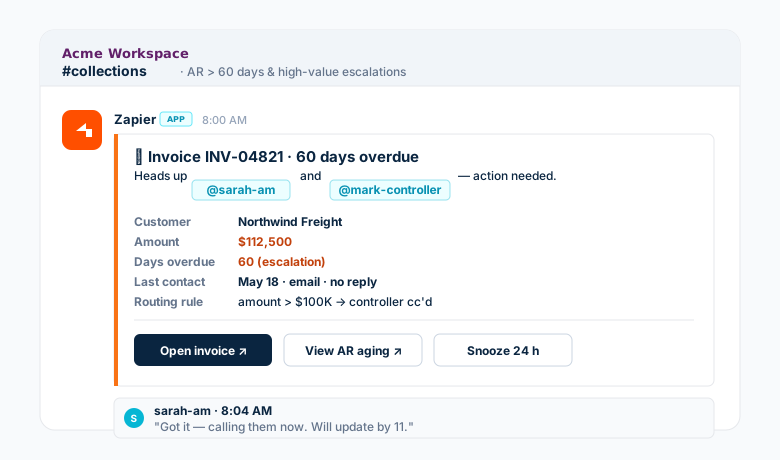
Mention patterns that work
- Owner mention — the assigned AE / CSM / dispatcher gets the
@-mention on anything tied to their book. - Tiered escalation — the mention list grows with severity (amount, age, customer tier, SLA breach).
- Backup / OOO — when the primary owner has OOO set in Calendar, the mention automatically swaps to their declared backup.
- User group mention — for cross-cutting issues,
@on-callor@billing-leadspings whoever's currently in that role, not a stale list. - Thread, not channel — for chatter, replies live in the thread so the main channel stays scannable.
- Mention budget — set per-day caps per person per channel; if you blow the cap, route to email digest instead. Stops alert fatigue cold.
/ 05 · BEYOND THE BASICSFive patterns operators rarely think to automate first
Once handoffs, digests, approvals, and mentions are in, the next batch of automations is where the surprise wins live. These are all 30-minute Zaps that change the texture of how a team operates.
A · KPI threshold alerts
The pipeline drops below a target. Utilization slips below 60%. Open tickets cross a count. Zapier polls the source (or listens for a webhook), and when the threshold breaks, posts a Slack card with the current number, the trend, and a button to the dashboard. The team sees the issue before leadership has to ask about it.
B · Out-of-office & on-call routing
When a person sets OOO in their calendar, every Zap that would have pinged them instead pings their declared backup — with full context, not just "Priya is out." This is the single most-loved automation we've shipped, because it preserves the routing intelligence the team built up by hand.
C · Kudos & customer shoutouts
NPS survey comes back with a 9 or 10 and a comment. Zapier posts the customer name, the comment, and the AE / CSM owner to #wins, with a 🎉. Cheap, but it changes morale. Same pattern for closed-won announcements, work anniversaries, and birthdays.
D · "Did anyone reply?" follow-up nudges
An alert went to @sarah two hours ago and hasn't been reacted to. Zapier escalates to her backup or her manager — politely, in a thread reply on the original message. The signal doesn't die in a busy day.
E · Cross-system status reconciliation
When the ERP says "delivered" but the carrier API says "in transit," Zapier flags the divergence into ops chat. Same for AR payment reconciliation, telematics asset state mismatches, and HRIS / payroll employee status drift. The mismatches stop being month-end surprises.
/ 06 · PER-TEAM SCENARIOSWhat every operational team actually wins
Different teams care about different signals. Here is the matrix we typically scope against in the first workshop — pick three rows per team for phase one, then add as the team asks for more.
| Team | Scenario | Channel | Cadence |
|---|---|---|---|
| Sales · Marketing | High-value lead in | Slack · #sales-priority | Real-time |
| Daily pipeline digest | EOD | ||
| Campaign milestone hit / missed | Slack · #marketing | Real-time + weekly digest | |
| Operations | Job status change & dispatch alerts | Teams · Ops channel | Real-time |
| SLA breach watch | Slack · #sla-alerts | Real-time, tiered mentions | |
| EOD operations digest | EOD | ||
| Billing · Collections | Large unpaid invoice (> $X) | Slack · #collections | Real-time, controller cc'd |
| Refund / credit memo approval | Teams · adaptive card | Real-time | |
| AR aging digest | Weekly | ||
| Payroll · HR | Pay-period prep checklist | Teams · Payroll channel | Scheduled · pre-cutoff |
| Time-off request approval | Teams · adaptive card | Real-time | |
| New hire onboarding kickoff | Slack DM · manager | Triggered on HRIS create | |
| IT · Admin | Privileged access request | Slack · #it-helpdesk | Real-time approval |
| System / SLA breach watch | Teams · IT-Alerts | Real-time | |
| Account provisioning & offboarding | Slack DM · stakeholders | Triggered on HRIS / Okta event |
The fastest path to muted channels is shipping every row above on day one. Start with three per team — usually one real-time alert, one approval flow, one digest. Once those are loved, the team will tell you what's missing.
/ 07 · NOTIFICATION DASHBOARDSGoogle Sheets fast, Azure-hosted governed
Once the notifications are flowing, leadership wants to see them in aggregate — what fired today, where, to whom, and how often. There are two patterns we use depending on the maturity and governance needs of the org.
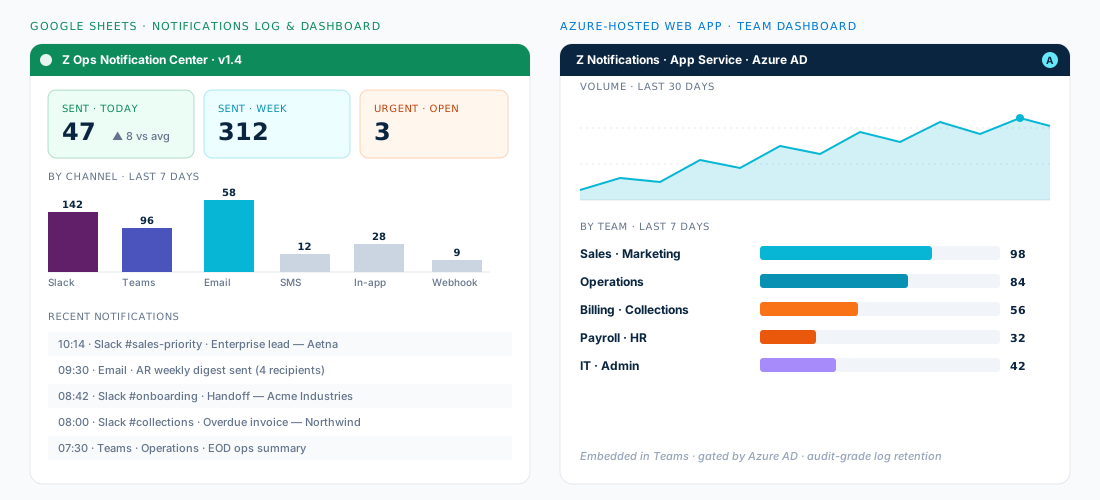
Option A · Google Sheets — log + dashboard in a day
Every Zap writes a row to a Notifications Log sheet — timestamp, channel, recipient(s), trigger source, message preview, and the action taken (if any). A second tab is the dashboard — KPI tiles (sent today / week / urgent open), a bar chart by channel, a recent-notifications table. Google Sheets pivots and basic chart blocks do the heavy lifting. Apps Script polishes it if you want fancier visuals. Cheap, fast, and operators love it.
Option B · Azure-hosted web app — when governance matters
The same data, but written to Cosmos DB or an Azure SQL table from a Zapier webhook, with a small App Service or Static Web Apps frontend on top. Gated by Azure AD, embedded inside Microsoft Teams as a tab, with audit-grade retention and the right RBAC for who can see whose notifications. We typically reach for this once the data is going to be referenced in audits, integrated with Power BI, or shared across business units.
| Dashboard concern | Google Sheets | Azure-hosted app |
|---|---|---|
| Time to first usable view | hours | 1–2 weeks |
| Cost | essentially free | Modest Azure spend |
| RBAC / SSO | Google account | Azure AD · groups · conditional access |
| Embedded in Teams | Link only | native tab |
| Audit / retention | basic | configurable, long-term |
| Integrates with Power BI | via export | native dataset |
| Best for | SMB & team-level visibility | Enterprise / governed / cross-BU |
/ 08 · ZAP DESIGN PRINCIPLESHow to keep notifications loved, not muted
Five rules that have saved us — and our clients — from notification fatigue every single time:
- 1 · One Zap, one verb. A Zap either handoffs, alerts, digests, requests, or kudos. If you find yourself doing two of those in one Zap, split it.
- 2 · Filter at the source. Don't post 500 things to Slack and expect humans to ignore 480. Filter in the Zap so only the actionable ones make it through.
- 3 · One button per message. Each notification names the next action. "Open in CRM," "Approve," "Assign to me." If there's no next action, the message probably shouldn't have fired.
- 4 · Threads beat channels for chatter. The first message goes in the channel; updates go in the thread. Saves the channel from becoming unreadable.
- 5 · Measure and prune. Track open rates, reactions, click-throughs to the embedded link. Any Zap that hasn't been engaged with for 30 days is a candidate for retirement.
/ CLOSINGLet the systems do the routing — keep humans for the judgment
The right outcome of a notification program is that your team stops chasing information and starts acting on it. The handoff message has the context. The lead alert has the owner. The approval card has the buttons. The end-of-day digest has the day in 30 seconds. The dashboard has the rest. None of this is glamorous — and that's exactly the point.
If you'd like a second pair of eyes on the workflows your team is doing by hand today, or a fresh build across one of the team scenarios above — tell us what you're trying to ship, and we'll come back within a business day with a real perspective on what to build first, what to leave alone, and how to keep your team out of the muted-channels graveyard.
We build, test, deploy, and support notification automations across Slack, Microsoft Teams, and email — using Zapier as the routing brain, and layering Google Sheets or Azure-hosted dashboards on top so the right people see the right signal at the right time. So your team can stop chasing information and get back to running the business.