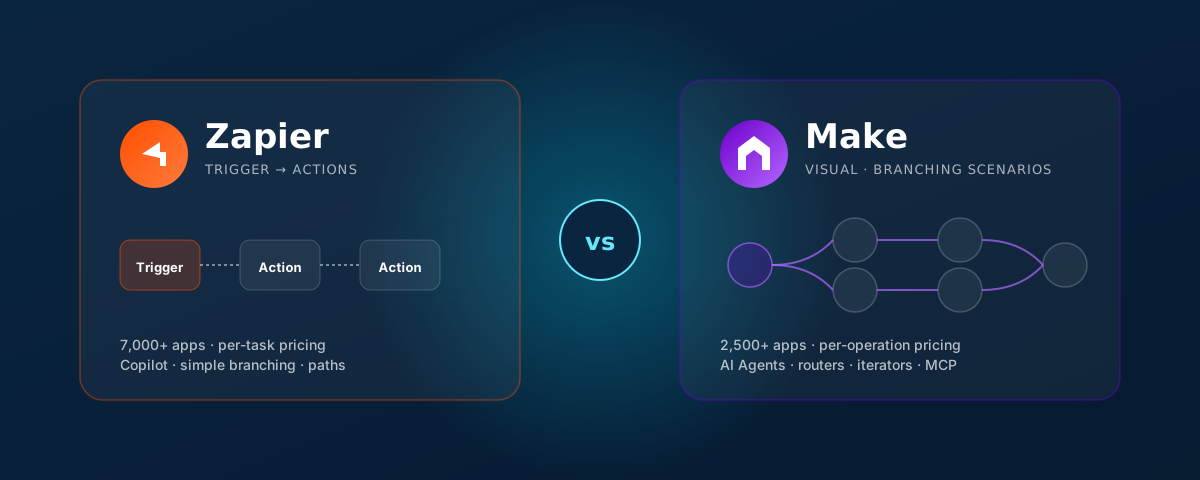
For most teams the question isn't “should we automate?” — that's settled. The real question is which platform you point at the next dozen workflows. Zapier and Make (formerly Integromat) are the two iPaaS choices that come up in nearly every conversation we have with operators and CTOs. They look superficially similar — drag, drop, connect — but they make very different bets about who the user is and what an automation looks like.
This piece is the comparison we wish someone had handed us before our first build on each: where each platform wins, where the real cost lives, and the workflow shapes that should push you toward one or the other.
Pick Zapier if your priority is breadth of app coverage, fast wins for non-engineers, and you can keep workflows mostly linear. Pick Make if you need real branching, iteration, and aggregation, you'll run at scale, and your team is comfortable thinking visually about flow. Many serious teams end up with both — Zapier for surface-area integrations, Make for the workflow engine.
This post contains an affiliate link to Make. If you create an account via that link, we may earn a commission — at no extra cost to you. It does not change our take: we recommend Make for the workflow shapes called out below regardless of the link. Other tools mentioned (Zapier included) are not affiliate links.
/ AT A GLANCEThe high-level scorecard
Before we drop into each axis, here is the one-page version. Specifics are in the sections below.
| Dimension | Zapier | Make |
|---|---|---|
| App ecosystem | 7,000+ apps · broadest in the category | 2,500+ apps · covers the common SaaS surface |
| Workflow model | Linear Zap: trigger → steps (Paths for branching) | Visual scenario: modules + routers + iterators + aggregators |
| Pricing unit | Per task (each successful step) | Per operation (each module run, including filters) |
| AI build | Zapier Copilot, AI builder, Zapier Agents | Make AI Agents (Claude/OpenAI), MCP support, Make AI assistant |
| Testing & deployment | Per-step test, version history, drafts, replays | Full scenario simulation, bundle-level debug, scenario versioning, DataStores |
| Learning curve | low non-technical friendly | medium visual, but needs flow thinking |
| Best for | Marketing, sales ops, founders, <10-step linear flows | Ops, finance, eng-adjacent — complex, branching, high-volume flows |
/ 01 · APPS & INTEGRATIONSBreadth vs. depth of the app catalog
The catalog is the first axis that matters because the platform you choose has to actually talk to the systems you already run. Both vendors publish their app counts and both numbers are accurate but slightly misleading on their own.
Zapier has the broadest published catalog in the iPaaS category — around 7,000+ integrations. The long tail is real: niche scheduling apps, regional payment processors, marketing tools you've barely heard of, almost all have a Zapier connector. For most teams this means the answer to “does it talk to X?” is reliably yes.
Make's published catalog is smaller — around 2,500+ apps — but it covers virtually all the systems a serious business actually runs (Salesforce, HubSpot, NetSuite, Xero, QuickBooks, Microsoft 365, Google Workspace, Stripe, Shopify, Slack, Notion, Airtable, the major databases, and so on). What Make trades in long-tail breadth, it makes up in connector depth — its modules tend to expose more of an app's API surface area, and its first-class HTTP/JSON/XML modules make integrating any REST or SOAP API feel native.
| App ecosystem detail | Zapier | Make |
|---|---|---|
| Published app count | ~7,000+ | ~2,500+ |
| Long-tail / niche apps | strong often the only one with the connector | selective covers mainstream depth |
| Connector depth (API coverage) | good for common actions | deeper more endpoints, raw access |
| Generic HTTP / Webhooks | Webhooks by Zapier · Code by Zapier | HTTP · JSON · XML · SOAP · WebSocket modules |
| Custom app / private connector | Developer Platform (private & public) | Custom Apps SDK + Apps Toolkit (richer dev tooling) |
| Authentication patterns | OAuth, API key, basic | OAuth, API key, basic, JWT, AWS Sig4 (more out of the box) |
The honest rule we use: if you need to integrate 15 different SaaS tools across marketing, sales, and ops, Zapier's catalog has fewer dead-ends. If you need to integrate 3 SaaS tools deeply plus a couple of custom or legacy APIs, Make's HTTP-first modules and richer auth options will save you time.
/ 02 · INTEGRATION FEATURESWhat the workflow runtime actually lets you build
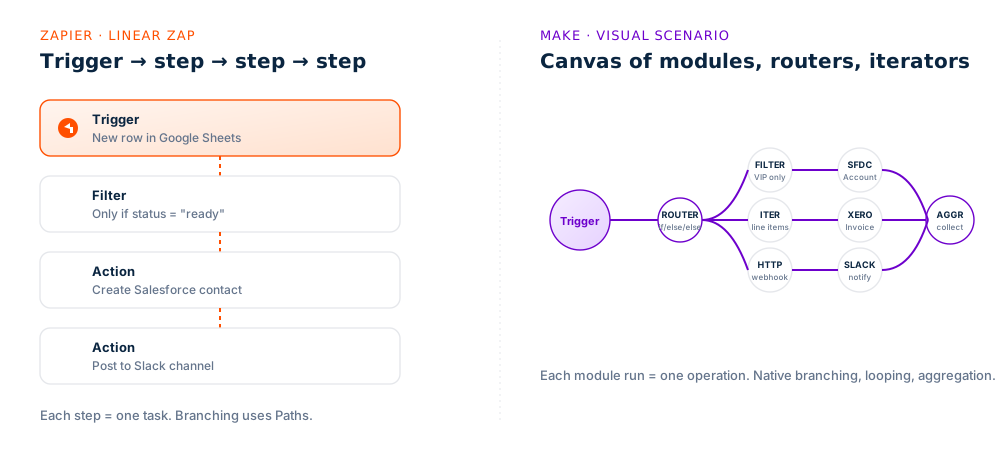
This is where the two platforms diverge philosophically. Zapier's runtime is essentially a managed step-by-step executor — built so a marketing manager can wire up a Zap on a Tuesday afternoon. Make's runtime is a managed flow engine — built so an ops lead can model a real branching business process.
Where they're equivalent
- Scheduling and webhooks — both run scheduled, on-demand, and webhook-triggered workflows.
- Filters — both let you short-circuit a flow when a condition isn't met.
- Variables and data mapping — both auto-discover fields from upstream steps for downstream use.
- Code execution — Zapier's Code by Zapier (JS/Python) and Make's Tools / Custom JavaScript both let you drop into code when you need to.
- Error notifications — both can email/Slack on failures and offer re-runs.
Where they differ — and it matters
| Feature | Zapier | Make |
|---|---|---|
| Branching | Paths (premium feature; up to 5–10 paths typical) | Routers native, unlimited branches |
| Iteration / loops | Looping by Zapier (limited) | Iterator + Array Aggregator first-class |
| Aggregation | limited typically via formatter steps | Text · Numeric · Array aggregators |
| Per-branch error handling | no Zap-level only | yes Break / Resume / Rollback / Commit handlers per module |
| Stateful storage | Storage by Zapier (key–value, lightweight) | DataStores (typed columns, queryable, scenario-shared) |
| Sub-workflows | Sub-Zaps (limited reusability) | Make scenarios can call other scenarios; "Make Bridge" SDK |
| Data transforms | Formatter by Zapier (good) | Built-in functions, regex, dates, JSON, math (rich) |
| Throttling / rate limits | Plan-level concurrent runs | Per-scenario interval & max cycles · sleep module |
The pattern is consistent: anything involving a loop, a branch, an aggregation, or partial failure recovery is materially easier in Make. If your workflow is trigger → 4 sequential steps → done, Zapier is faster to build. The moment the workflow grows a “for each line item, only if X, otherwise webhook out and continue” shape, Make pays you back.
/ 03 · PRICING MODELWhy per-task and per-operation lead to different bills
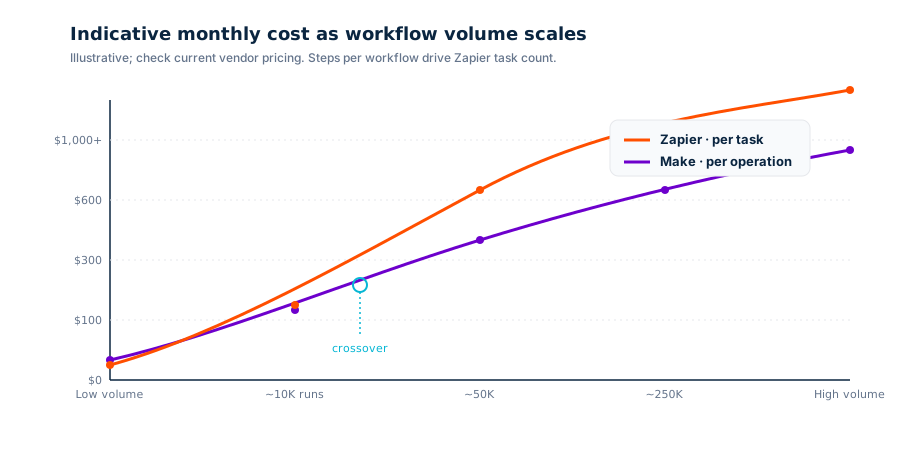
The headline plans look comparable, but the unit of pricing is what determines your actual monthly bill at scale, and they differ in an important way.
Zapier bills by task: each successful action step counts. A 4-step Zap that runs 1,000 times consumes 4,000 tasks. Triggers and filters generally don't count, but every action does.
Make bills by operation: every module run counts, including filters, routers, and iterations. A scenario with 6 modules that runs 1,000 times consumes 6,000+ operations, with iterators multiplying the count when they loop.
So the comparison isn't task-per-task — it's workflow shape × pricing unit. In our experience, Make tends to be substantially cheaper for high-volume, multi-step, branching workflows, while Zapier is competitive (and often simpler to budget for) on lower-volume, linear workflows.
| Pricing dimension | Zapier | Make |
|---|---|---|
| Unit | Task = one successful action | Operation = any module run |
| Free tier | ~100 tasks/month · 2-step Zaps · 5 Zaps | ~1,000 ops/month · 2 active scenarios · unlimited modules |
| Entry paid plan | Starter — multi-step Zaps, filters, formatter | Core — full module library, unlimited active scenarios |
| "Premium" features | Paths, webhooks, code, sub-Zaps gated by plan tier | All workflow primitives included from Core; Pro adds priority, more vars |
| Minimum execution interval | 1–15 min depending on plan | 1 min on Core; instant triggers on most apps |
| Cost shape at scale | Compounds with steps × runs (tasks) | Compounds with modules × runs · cheaper per unit at scale |
| Enterprise tier | SSO, governance, custom data residency | SSO, custom variables, audit logs, EU/US data residency |
Always model the bill against your actual workflow shape, not the headline pricing page. A 3-step Zap firing 5,000 times/month is dramatically cheaper than a 12-step Zap firing 5,000 times/month. Same on Make — a scenario with two iterators can quietly 10× your operations count. Build the workflow, run a week of real data, then trust the numbers.
/ 04 · BUILDING WITH AICopilots, AI builders, and AI agents
Both vendors have made AI a core part of the product story over the last 18 months. The approaches are different — and the gap is wider than the marketing suggests.

Zapier — AI as the build assistant
Zapier's headline AI capability is Zapier Copilot: describe the workflow in plain English, and Copilot drafts the Zap with the right triggers, actions, and field mappings. For non-technical users this is genuinely the fastest path from idea to working automation we've used. Zapier also offers in-Zap AI actions (ChatGPT, Claude, OpenAI completions, image generation) and the newer Zapier Agents product, which lets you configure an AI agent with a set of Zapier-backed tools.
Make — AI as a runtime primitive
Make has gone further into the agentic side. Make AI Agents (built on Claude or OpenAI models) are first-class objects in the product: you give an agent a system prompt, a memory, and a set of tools — which can be Make modules, custom HTTP endpoints, other scenarios, or external MCP servers. The agent chooses which tool to call per turn rather than executing a fixed sequence. Make also has an AI assistant for building scenarios from natural language, similar in spirit to Copilot.
| AI capability | Zapier | Make |
|---|---|---|
| Natural language → workflow | Zapier Copilot mature, polished | Make AI assistant capable, less polished |
| In-workflow LLM actions | OpenAI · Claude · Gemini · custom connectors | OpenAI · Claude · Gemini · Mistral · Perplexity · custom |
| Agent product | Zapier Agents (deterministic skeleton + AI) | Make AI Agents (true agentic loop with tool use & memory) |
| Tools an agent can call | Zapier actions / Zaps | Make modules · scenarios · custom HTTP · external MCP servers |
| MCP support | MCP server endpoint exposes Zapier as MCP | native consume external MCP servers as agent tools |
| Memory / context | Limited per-Zap context | Per-agent long-term memory + DataStores |
| Best fit | Fast AI-assisted authoring of deterministic Zaps | Agentic workflows that mix LLM reasoning with deterministic steps |
If you want AI to help you build automations, Zapier Copilot is the smoother product today. If you want AI to be the workflow — reasoning, choosing tools, calling out to your stack via MCP — Make is the more honest agentic runtime.
/ 05 · TESTING & DEPLOYMENTThe unsexy stuff that decides whether you ship
Both platforms are SaaS — there is no git push to production. But that doesn't mean there's no lifecycle, no testing surface, and no versioning. This is the area where customers most often hit a ceiling, so it deserves a careful look.
Zapier — testing
- Per-step test: every step has a "Test trigger / Test action" button that pulls real data from the upstream system and runs the step against it.
- Draft mode: Zaps can sit in draft until published. There is no first-class staging/production separation.
- Task history: every run is logged with input/output per step — searchable, replayable.
- Replays: failed runs can be re-run manually after fixing upstream data.
- Version history: Zaps have versioning with the ability to revert. Limited collaboration controls.
Make — testing
- Run once / dev mode: run the entire scenario manually with real data, see each module's input and output bundle.
- Bundle-level debug: inspect the exact JSON moving between modules — invaluable for diagnosing format issues.
- Scenario versioning & clones: scenarios can be cloned and versioned; common pattern is staging/prod scenarios with different webhook URLs.
- Incomplete executions queue: failed runs are quarantined; you can fix and re-run from the failure point with full state.
- DataStores: queryable state that survives runs, useful for idempotency keys, dedup, and state machines.
- Error handlers per module: Break, Resume, Rollback, Commit, Ignore — declarative, per-module.
| Lifecycle capability | Zapier | Make |
|---|---|---|
| Step / module testing | per-step test | full scenario run + bundle inspect |
| Staging vs production | draft / live only | multi-scenario cloning + folders |
| Version history | yes, revertible | yes, plus full scenario export (blueprint JSON) |
| Run / execution history | task history per-step | execution history with bundle drill-down |
| Error recovery | Manual replay of failed runs | Incomplete executions + per-module handlers (auto-retry, etc.) |
| State / idempotency | Storage by Zapier | DataStores typed & queryable |
| Export / portability | Limited (templates) | Blueprint JSON export & import — diffable in git |
| Team / governance | Teams & Company plans · SSO · folders | Teams & Enterprise · SSO · audit logs · custom variables |
If you treat automation as a real piece of engineering — with idempotency, retries, observability, and versioning — Make's runtime gives you more of what you'd expect from a workflow engine. Blueprint JSON export alone is a big deal: you can put scenarios in git, code-review changes, and roll forward / back with discipline. Zapier's lifecycle works fine for marketing-ops-scale workflows but visibly bends under the weight of mission-critical operational ones.
/ VERDICTWhen to pick which
The honest answer is rarely "one to rule them all." For every team we've worked with, the picture has been: pick the primary platform that matches the dominant workflow shape on the roadmap, and use the other one tactically for the cases it's better at.
Pick Zapier when…
- You need to connect to a long tail of niche or regional SaaS apps.
- Workflows are mostly linear — trigger then 3–6 sequential steps.
- The builders are non-technical (marketing, sales ops, founders).
- You want the fastest natural-language-to-working-automation experience (Copilot).
- Volume is modest and predictable.
Pick Make when…
- Workflows have real branching, looping, and aggregation.
- You'll run at high volume and per-unit cost matters.
- You need per-step error handling and idempotency guarantees.
- You want AI agents with tool use and MCP — not just AI-assisted builders.
- You want scenarios as code (blueprint JSON in git) and a real staging story.
Workflow-shape cheat sheet
| If your workflow looks like… | Start with | Why |
|---|---|---|
| New lead → enrich → write to CRM → Slack | Zapier | Linear, 3–4 steps, broad app coverage. |
| New order → per-line-item invoice + inventory + notify | Make | Iteration + aggregation + branching. |
| Form submission → AI-summarise → email | Either | Both handle this well; pick on team skills. |
| Multi-system reconciliation with retries & idempotency | Make | DataStores + per-module error handling. |
| AI agent that reasons over CRM + web + ticketing tools | Make | True agent runtime + MCP. |
| Connecting a niche or regional app to Slack/Sheets | Zapier | Long-tail catalog win. |
For new client builds, we tend to start with Make when the workflow has any real branching or scale, and start with Zapier when the dominant requirement is breadth of connectors or non-technical authoring. About a third of our clients end up with both deployed — Zapier as the "front door" for low-stakes connections, Make as the workflow engine for anything operational.
/ FINALClosing thought
The right way to compare iPaaS tools isn't feature-by-feature on a vendor's marketing page — it's by sketching the actual three or four workflows you need to ship next quarter, and stress-testing them against each platform's runtime model and pricing unit. That's the exercise this piece is meant to short-circuit.
If you'd like a second pair of eyes on which platform fits your roadmap — or you want help building the first few workflows on either — that's literally what we do. Tell us what you're trying to ship, and we'll come back within a business day with a real perspective.